

Unibet Login and Registration with Verification Process in Ireland
You need your personal Unibet Casino login details to bet on real money games and earn winnings. The Unibet account creation process is simple, as you only need to provide your email and a few details. After registration, verification immediately follows, and once you complete the exercise, you can perform a successful login without issue at Unibet Casino.
Why You Should Complete Your Unibet Sign Up for Casino or Betting
Having a personal Unibet account gives you access to 4,000+ games in both demo and real money mode, a dedicated casino app and great promotions.
We outline all the major benefits to expect after setting up your own account.

- You get access to three dedicated apps for casino, poker and sports.
- You may maximise our Two Factor Authentication system to secure your Unibet sign in process, further improving your overall security.
- There is an active responsive customer service to assist whenever you need. We offer a 24/7 live chat service as well as email and FAQ support.
How to Sign Up and Join Unibet Register
Providing a personal email and submitting your name and gender, while agreeing to our TOS are the major requirements to complete your Unibet sign up. Still, you must be at least 18 years and have a legitimate income source to have your name in our Unibet register.
- Start registration: You need to click the Create Account button at the top right corner of the screen to enter the sign up field.
- Submit Email and Personal Information: Submit your full name, birth date, email and gender in the specified fields. Also, set up a password of 8 or more characters comprising at least an uppercase and lowercase alphabet, a number and a symbol.
- Provide Your Address: We offer you the option to submit your address automatically with our system confirming it. The alternative option is to offer a manual fill up of city, home address and post code.
- Agree to Our TOS: You have to tick the box that confirms you are 18 years and agree to our terms and conditions and privacy policy to complete the registration.
List of Documents Need for Account Approval
Even after registration, we will still ask you to provide an ID document like driver licence, passport or a Govt ID and an address bearing utility bill. We request these documents during the Unibet verification phase so that we can confirm your gambling eligibility and keep the community safe.
Main documents to submit
- ID docs: Driver licence, passport or an official Govt. ID
- Residency Docs: Bank account statement or an address-bearing utility bill not older than 3 months.

Unibet Verification for Irish Players and Legal Safety
Immediately after registration we will ask you to upload a driver licence or passport to verify your ID and your bank account statement to verify your Ireland residency. Follow this guide to start and finish your Unibet verification.

- Know the Details to Upload: On completing your sign up, a verification tab will pop up requesting you provide photos of relevant documents that establish your identity and address.
- ID Verification: Upload a photo of a driver licence, passport or government ID that confirms your person and age.
- Irish Residency Verification: Upload an image of your statement of bank account or utility bill of at least 3 months.
- Wait For Verification: We will verify your account in under an hour once we confirm the legitimacy of the document you upload.
Unibet Casino Login Steps for Desktop and Web Browsers
Your Unibet login details are the email and password you submitted during registration and are basically what you need to access your profile from any device. We offer a comprehensive Unibet log in step-by-step guide on how to sign into your profile.
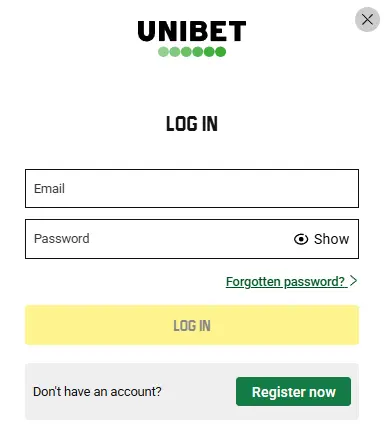
- Go to the Login Page: On our homepage, click the top green Login Unibet at the to right corner of the screen to enter a window with fields
- Submit Email and Password: You need to submit your email and password in the respective fields portrayed.
- Sign In: Click the Log in button to sign into your account and continue your session.
| Login Method | Standard email and password access |
|---|---|
| Approximate Time to Sign In | 2 minutes |
| Password Recovery Available? | Yes |
Unibet Mobile Login via App
Mobile app users can log in with their registration email and password just like PC users. With these steps you can complete your Unibet mobile login and start gambling
- Install App: Download the Casino, Poker or sports app from the Apps window on our official page. Each of these software are compatible with Android and iOS.
- Go to your App Login Page: Click the Login button to enter the sign field. We need to emphasise that you only need one registration to use any of our software. Hence your casino app sign in details is the same as the Unibet sports login data.
- Submit Login Details: Fill out your email and password on their respective fields and click the login button to access your account.
Signing in on mobile makes it much easier to play on the go and personalise your session better.
Securing Your Personal Data and Privacy Standards
Your Unibet sign in details and verification documents are secured with our advanced SSL encryption system and two factor authentication system (2FA).
- SSL / TLS Encryption: This system protects your registration and verification information and also protects your gambling activities.
- Two Factor Authentication: This system reinforces your sign in safety by triggering a unique code request whenever you try to access your account from a new device.
Common Unibet Sports Login Issues for Players and Solutions
Some of the common Unibet login concerns you may experience include email/password rejection, unresponsive sign in page and website downtimes. We highlight these possible Unibet Casino login issues and how to solve them.
- Rejected Email/Password: Simply confirm that your password is accurately typed with all capitalisations and symbols maintained as during registration.
- Unresponsive Sign in Page: This is likely a network issue and changing your reception will fix the problem.
- Website Not Working: There may be rare website downtimes on our end that could lead to our homepage or the Unibet sports login page not running. In such a situation, you just have to wait for a few hours and the website will start running again.
How to Recover Your Password
You can recover your Unibet login password and still get access to your account by going to the sign in page and clicking on the Forgot Password link. We will then send a Unibet log in password reset mail to your email. Click on the link to enter a field where you can recreate a new password to access your profile.
How to Delete Unibet Account
Sending a message to support through live chat and email is the first step to starting your Unibet account deactivation. See the complete guide to delete your profile.
- Clear your balance: Sign into your account and withdraw all the money in it to leave a clean slate.
- Contact Support: Reach out to support through email or live chat and place your request to delete Unibet account.
- Request Approval: The agent will guide you through all prompts before deleting the account. You should also know that there is a self-exclusion option if you only want a short break.
